
SpinBet Login Process for Players from New Zealand
Before proceeding to Spin Bet login, make sure you have already created an account with the platform. During the registration process at Casino Spinbet, you will be asked to choose a username and password. Ensure that you memorise the words you use in these areas because they will be your ticket to logging into the website subsequently.
How to Join SpinBet Casino
Anyone above 18 who is a resident in a country where online gambling is not restricted is welcome to join SpinBet Casino. The process of creating an account is easy and will take you less than 3 minutes to complete. You will be asked to choose a username and password, as well as provide your email address and phone number.
The username and password you entered will be used subsequently to log into your account and cannot be changed. Therefore, you must think carefully and choose a memorable username and password. Your email address and phone number provide the online casino with a means of communicating with you. Right after the registration you’ll be able to complete a Spinbet NZ login and enter your account.
Alternatively, you can log in with your social profile, and the one currently accepted at SpinBet is Gmail. So, if you don’t want to go through the stress of filling out rows of personal data, you can use your Gmail account to join the platform.
SpinBet Casino Login Process
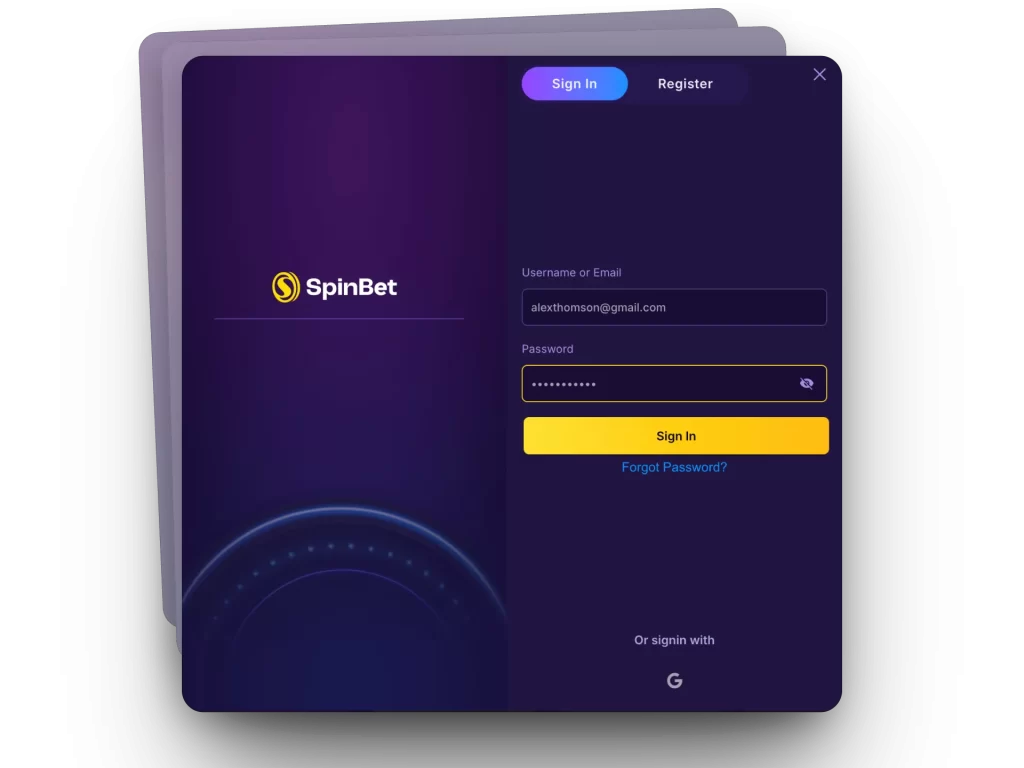
If you have previously created an account, your SpinBet login can be completed using your username or email address and your password. Visit the website and click on the “Login” button in the top-right corner. A new window with two fillable rows will open.
- In the first row, type in your username or the email address you provided while opening the account.
- In the second row, type in your password.
- Click the sign-in button at the bottom.
If you filled in the correct details, the page should reload and take you to your account. If you have forgotten your password, click the “Forgot Password?” link and follow the prompt to reset your password.
Why we Ask for Your Personal Data
While Spinbet Casino login requires you to enter only email and password, during registration we ask you for the personal data. It includes your date of birth, country of residence, phone number and email address. However, you must bear in mind that the casino may ask for more personal details for verification, including a government-approved ID, utility bills or a bank statement.
This data ensures the casino is compliant with local anti-money laundering and Know Your Customer regulatory requirements. It is important to mention that these personal data are not stored beyond the period required. Also, your personal data is safe because the website uses SSL encryption technology to prevent data breaches from bad actors.
Spin Bet Login via Mobile App
SpinBet login can also be done through the mobile app, and the process is the same whether you are using an Android or iOS device. Since we don’t offer a native app, you should install our PWA version using your web browser (preferably Chrome on Android or Safari on iOS). Assuming you have done that already, follow the steps below to log in.
- Launch your web browser.
- Find the SpinBet app icon on the home screen and launch it.
- Click the Spinbet NZ Login button in the top-right corner of the screen.
- Type in your username/email and password and press the Spin Bet Casino login button.
How to Delete an Account at SpinBet Casino
Every casino is disappointed to see its loyal members go. However, we understand that for some reason, players may want to take a temporary or permanent break from gambling activities. Whatever the reason may be, SpinBet has a dedicated team that will help to fast-track the process.
Punters who may be struggling with gambling overdrive can contact the casino’s support team and request self-exclusion. There are self-exclusion tools available on the platform that allow the punter to temporarily or permanently disable their account. Once temporary self-exclusion is turned on, you will not be able to deposit, place bets or withdraw funds.
We may also close a player’s account if they violate the terms, failure to provide verification documents or suspicious activity. When this happens, your SpinBet login details will cease working, and your account’s cash balance will be forfeited.